Three clocks run on one order, and they start at different moments
Policy excerpts below were read on 10 October 2026. The current account countdown and official support response are the relevant checks for your order; a historical schedule is not a delivery guarantee.
Storage counts from stored. Return counts from stock-in. A seller's platform guarantee counts from signature. Only one of them is still running while the photographs are useful.
Most confusion about after-sales windows comes from treating these as one period with one length. They are three, and their start points are further apart than their lengths.

The three windows, with their start points
| Window | Length | Starts at | Source |
|---|---|---|---|
| Free storage | 60 days | The order status reading stored | Help article 10075 |
| Return or exchange | 120 hours | The hour after the status becomes stocked in | Help article 10041 |
| Platform guarantee | 14 days, with a conflict noted below | The product being signed for | Help article 10041 |
The return window is the short one and the early one. It runs while the goods are in the warehouse and you are looking at photographs, which is the only period where the operator can still send something back without international shipping entering the question.
What the countdown looks like in the account
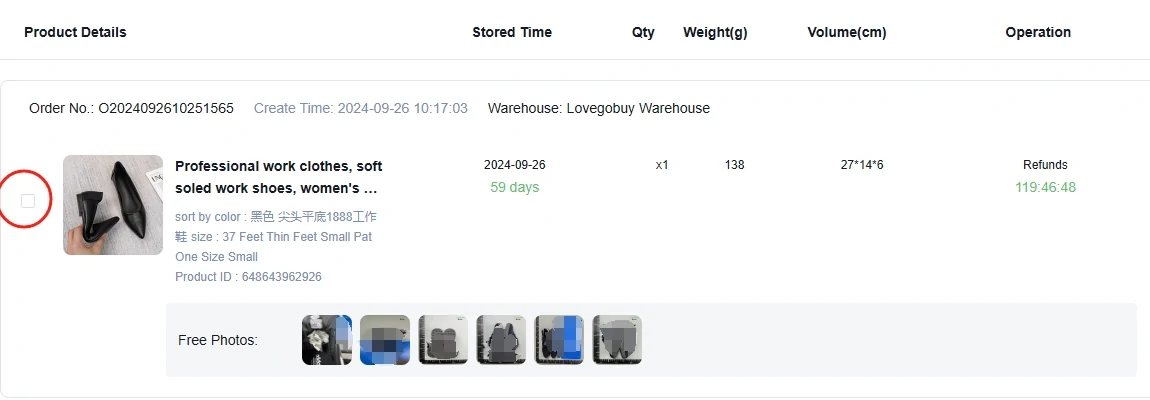
The countdown is in the entry, not in a policy page
The operation column carries a running countdown labelled Refunds, shown here at 119 hours and change, which lines up with the published 120 hours. The stored-day figure beside it belongs to the other clock entirely.
Seeing them side by side is the useful part. One number is measuring how long you may think about it; the other is measuring how long the warehouse will hold it.
The status that starts the clock, and where to read it
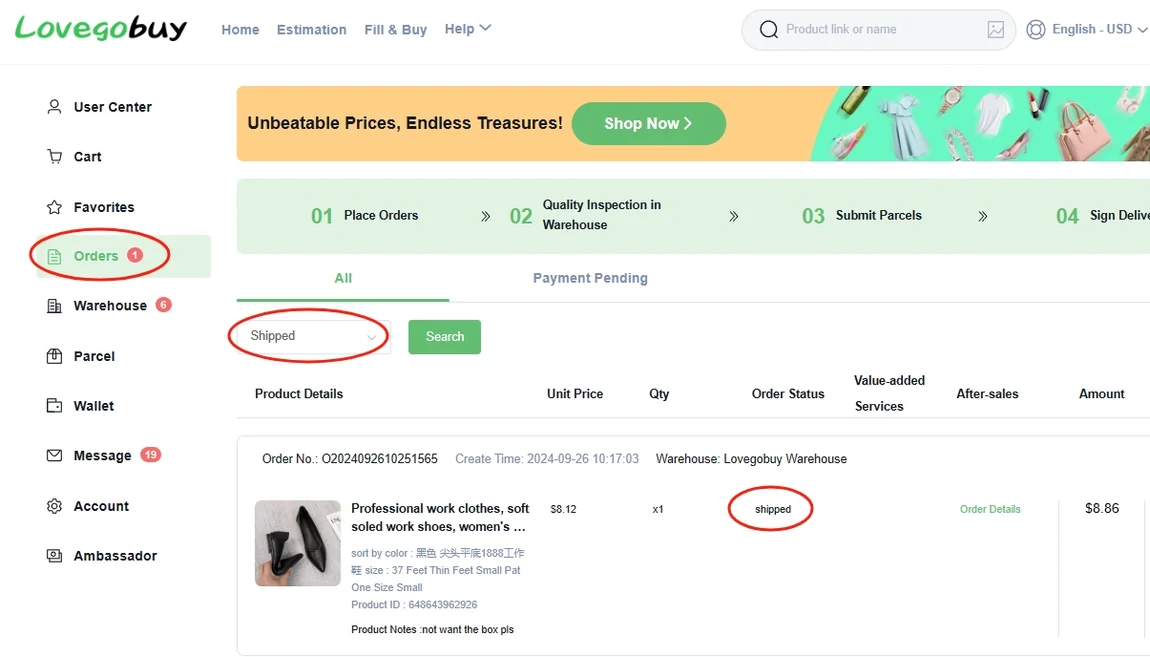
Watching for a date is the common mistake. The window keys off a status word, and the status is shown in its own column with a filter above it, which makes it something you can check rather than something you have to estimate.
The same view carries the product notes line, so the remark written at order time stays visible against the order through every stage. That is worth knowing before you decide the remark does not matter.
The conflict in the published figures
The return and exchange article is not internally consistent, and this site prints the disagreement rather than choosing quietly. Three figures appear around the same service.
| Figure | Where it appears | Counted from |
|---|---|---|
| 120 hours | The rules text for the operator's own return service | The hour after stock-in |
| 14 days | The heading of the platform guarantee section | Signature |
| 5 days | The eligibility table inside that same section | Not stated in the table |
Do not use a conflicting historical heading to calculate your deadline. Check the countdown on the current item record and ask official support which terms apply to your order. Review the photos promptly while the goods are still at the warehouse.
Storage, and what happens at the end of it
Free storage runs 60 days from the stored status. After that the published rule is that goods are treated as abandoned unless an extension is bought, and the extension itself is bounded: it applies only to items stored between 60 and 90 days, and total storage is capped at 6 months.
The extension is charged per product identifier per month rather than per parcel, which means a warehouse holding six separate finds is six charges, not one.
Before the clocks, the processing window
The processing article read on 10 October 2026 described handling targets by Beijing-time order window and estimated domestic seller and delivery times. These are planning estimates; stock, seller dispatch and warehouse workload affect the actual order. Use the order status and messages for an update.
The same article estimated about one working day for inspection after arrival. An estimate is separate from the return countdown that appears when the item is stocked in.
Points this raises
The storage clock and the return clock disagree
They are measuring different things and start at different statuses. Storage runs from stored and governs how long the warehouse holds the goods. Return runs from stock-in and governs how long you may ask for the goods to go back.
The countdown has run out but the photos show a problem
Contact support promptly with the order number and specific evidence. Standard deadlines may limit available options; the tool cannot decide whether an exception or seller remedy is available.
Which figure to use when two are published
Use the current account countdown and ask official support to clarify the conflicting published figures. These historical excerpts do not determine an individual deadline.