Remarks, and the second value every comparison needs
Three of the six inspected items are comparisons. A comparison with one value is not a check, and the remark box is where the second value comes from.
The remark is a free-text box on the order form. It will accept anything, which is exactly the problem: nothing about it signals which sentences the warehouse can act on.
What reaches the warehouse
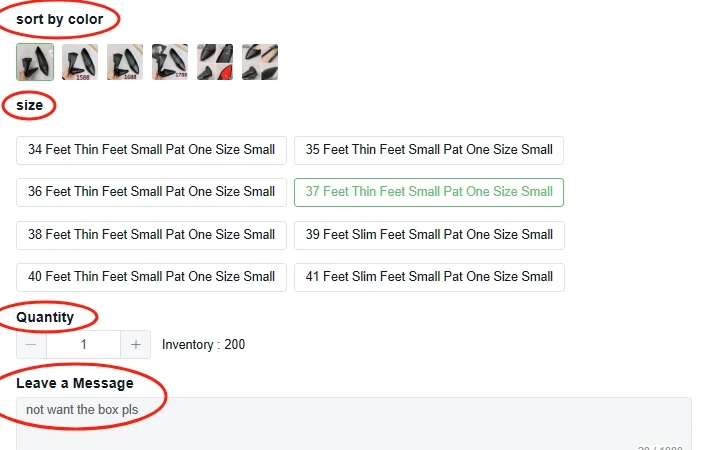
Four fields and one of them is prose
Colour, size and quantity are chosen from what the seller listed, so they arrive as values. The message box is the only place where your intent travels in your own words, and it is also the only one nobody validates.
The size options in this capture read like machine translation, which is normal on these listings and is part of why writing the size you mean into the remark is worth the twenty seconds.
Remarks that give the inspection something to hold
| Instead of | Write | Because |
|---|---|---|
| Please check carefully | Label should read 42 EU, reject if it reads 43 | Names a value the check can compare the tag against |
| Make sure it is the right one | Version 2 model, the one with the metal buckle | Model and version number are on the inspected list |
| I want the dark colour | Colourway: ink blue, not the black in photo three | Colour is inspected, but only against a stated name |
| Check the stitching quality | Photograph the inside seam at the collar | Workmanship is not on the list; a specific photo request is a different service |
| Nothing at all | The size, colourway and model you expect | Without a reference the comparisons have nothing to fail |
None of this makes the warehouse do more work than it already does. It makes the work it already does capable of returning an answer.
Buying a specific photograph
Write the purchase instruction and the photo request separately.
The option panel records what to buy: colour, size and quantity. The message field carries an additional instruction. Keep these roles separate. A note asking to remove a box does not establish which shoe size you selected, and an attached inspiration photo does not override the actual option on the order.
For a product choice, use the seller’s exact version label. For a packing request, name the packaging you mean and when you want the action taken. “Keep the retail box until I review the warehouse photos” is more precise than “keep packaging”, especially when a later return may depend on condition.
For an extra photo, name one observable question. “Show the label inside both shoes” identifies a view; “measure the bracelet from clasp to end in centimetres” identifies a measurement. A request that combines several parts may require several photos or a separate service. Confirm the current charge and scope before approving it.
The dialog below illustrates that distinction with one requirement per Extra Photo. Its sample fee and character limit are historical interface details. Use the current account controls and save the result with the order; a clearer request improves the record without guaranteeing a seller remedy.
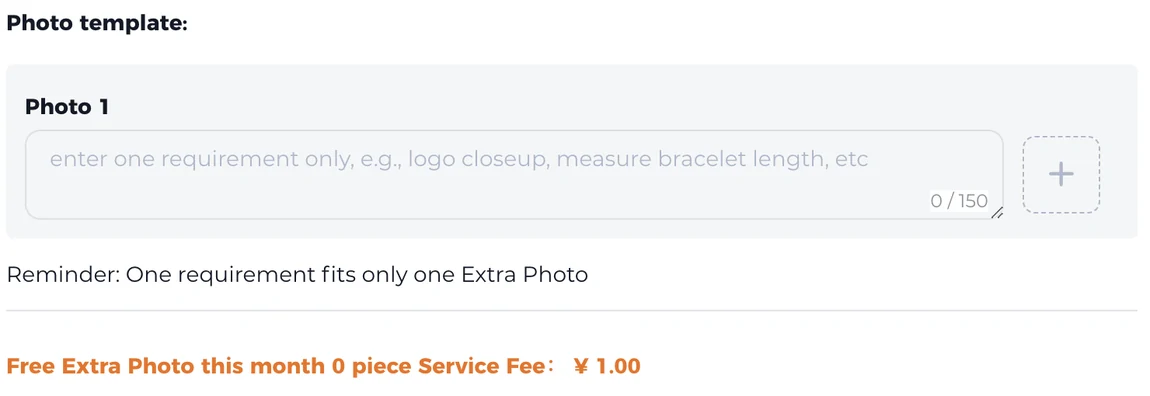
This is the route for the things the standard scope excludes. Measuring a garment is outside the inspection, but the Extra Photo field's own example is measuring a bracelet length, which means a measurement can be requested as a photograph even though it is not part of the free check.
The constraint printed under the box is the one to design around. One requirement fits only one extra photo, so three questions are three photos, not one photo with three notes attached. Write each one as a single instruction.
- A flat measurement across the chest, with a tape in frame
- The label and the tag together, so the size and the maker read in one shot
- A closeup of one named area, rather than an invitation to look around
Where remarks stop working
A removed tag cannot be restored by a remark, but another sewn-in label or product marking may remain. Check which reference is available and confirm the effect on return eligibility before requesting removal.
A remark also cannot change the scope. Asking for the colour to match the listing photo exactly does not move colour difference back inside the inspection, because the exclusion is published at the service level rather than decided per order.
Points this raises
The remark is written in English
That is the normal case for the English interface, and the order is handled by the operator's own staff rather than passed straight to the shop. Keep it short and put the values first, since a value survives translation better than a sentence does.
A remark was added after the order was placed
The published scope wording refers to your product remarks or the final change, so a later change is contemplated. Earlier is still better, because the comparison happens on arrival and the arrival is not something you schedule.
Asking for several things in one extra photo
The dialog states that one requirement fits only one extra photo. Separate requirements are separate photos, each with its own instruction.